
Introduction
- Data structures are basically structures which can hold some data together.
- They are used to store a collection of related data.
- There are built-in data structures in Python:
List
Tuple
Dictionary
List:-

- A list is a data structure that holds an ordered collection of items.
- A list can be composed by storing a sequence of different type of values separated by commas.
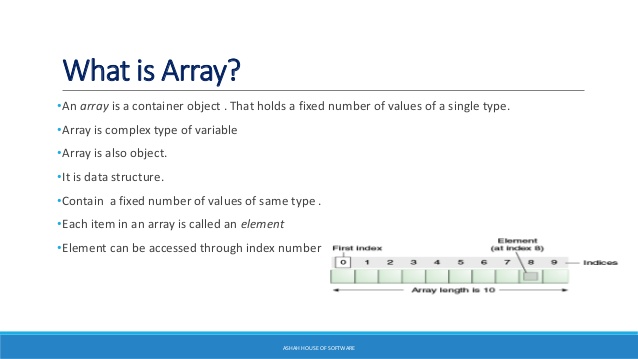
- The elements are stored in the index basis with starting index as 0.
- The elements are stored in the index basis with starting index as 0.
- The list of items should be enclosed in square brackets.
- Once a list is created, user can add, remove or search for items in the list.
- Python lists are mutable i.e., Python will not create a new list if we modify an element in the list.
Accessing List: A list can be created by putting the value inside the square bracket and separated by comma.
Syntax:
<list_name>=[value1,value2,value3,...,valuen];
Updating Lists:-
You can update single or multiple elements of lists by giving the slice on the left-hand side of the assignment operator.
Example:-
list = ['physics', 'chemistry', 1997, 2000]
print ("Value available at index 2 : ", list[2])
list[2] = 2001
print ("New value available at index 2 : ", list[2])
Delete List Elements:-
To remove a list element, you can use either the del statement if you know exactly which element(s) you are deleting.
Example:-
list = ['physics', 'chemistry', 1997, 2000]
print (list)
del list[2]
del list[2]
print ("After deleting value at index 2 : ", list)
Basic List Operations:-
Lists respond to the + and * operators much like strings; they mean concatenation and repetition here too, except that the result is a new list, not a string.

Indexing, Slicing and Matrixes
Since lists are sequences, indexing and slicing work the same way for lists as they do for strings. Assuming the following input −
L = ['C++'', 'Java', 'Python']


Hear ALL LIst OPeration Given


List Operations – cmp()
The cmp() method compares the elements of two lists.
Syntax:-
cmp(list1, list2)
Return value If elements are of the same type, perform the compare and return the result.
Example:-
list1, list2 = [123, 'xyz'], [456, 'abc']
print cmp(list1, list2) #-1
print cmp(list2, list1) #1
list3 = list2 + [786];
print cmp(list2, list3)#-1
List Operations – len()
The len() method returns the number of elements in the list.
Syntax:-
len(list)
Example:-
list1 = ['physics', 'chemistry', 'maths']
print (len(list1)) # 3
list2 = list(range(5)) #creates list of numbers between 0-4
list2 = list(range(5)) #creates list of numbers between 0-4
print (len(list2)) # 5
List Operations – max()
The max() method returns the elements from the list with maximum value.
Syntax:-
max(list)
Example:-
list1, list2 = ['C++','Java', 'Python'], [456, 700, 200]
print ("Max value element : ", max(list1)) # Python
print ("Max value element : ", max(list2)) #700
List Operations – min()
The min() method returns the elements from the list with minimum value.
Syntax:-
min(list)
Example:-
list1, list2 = ['C++','Java', 'Python'], [456, 700, 200]
print ("min value element : ", min(list1)) # C++
print ("min value element : ", min(list2)) # 200
List Operations – list()
The list() method takes sequence types and converts them to lists. This is used to convert a given tuple into list.
Syntax:-
list( seq )
Example:-
Tuple = (123, 'C++', 'Java', 'Python')
list1 = list(Tuple)
print ("List elements : ", list1)
str = "Hello World" list2 = list(str)
str = "Hello World" list2 = list(str)
print ("List elements : ", list2)
Output:-
List elements : [123, 'C++', 'Java', 'Python']
List elements : ['H', 'e', 'l', 'l', 'o', ' ', 'W', 'o', 'r', 'l', 'd']
List Operations - append()
The append() method adds an item to the end of the list.
Syntax:-
list.append(item)
Example:-
List = ['Mathematics', 'chemistry', 1997, 2000]
List.append(20544) print(List)
Output:-
['Mathematics', 'chemistry', 1997, 2000, 20544]
List Operations: extend()
Extends the list by adding all items of a list (passed as an argument) to the end.
Syntax:-
list1.extend(list2)
Example:-
List1 = [1, 2, 3]
List2 = [2, 3, 4, 5]
List1.extend(List2) # Add List2 to List1
print(List1)
List2.extend(List1) #Add List1 to List2 now
print(List2)
Output:-
[1, 2, 3, 2, 3, 4, 5]
[2, 3, 4, 5, 1, 2, 3, 2, 3, 4, 5]
List Operations: insert()
Inserts the element to the list at the given index.
Syntax:-
list.insert(index, element)
Position mentioned should be within the range of List, as in this case between 0 and 4, elsewise would throw IndexError.
Example:-
List = ['Mathematics', 'chemistry', 1997, 2000]
# Insert at index 2 value 10087
List.insert(2,10087)
print(List)
Output:-
['Mathematics', 'chemistry', 10087, 1997, 2000]
List Operations: sum()
Calculates sum of all the elements of List.
Syntax:-
sum(list)
Example:-
List = [1, 2, 3, 4, 5]
print(sum(List))
Output:-
15
List Operations: remove()
searches for the given element in the list and removes the first matching element.
Syntax:-
list.remove(element)
Example:-
list1 = ['physics', 'Biology', 'chemistry', 'maths']
list1.remove('Biology')
print ("list now : ", list1)
list1.remove('maths')
print ("list now : ", list1)
Output:-
list now : ['physics', 'chemistry', 'maths']
list now : ['physics', 'chemistry']
List Operations: index()
searches an element in the list and returns its index/position.
Syntax:-
list.index(element)
Example:-
list1 = ['physics', 'chemistry', 'maths']
print ('Index of chemistry', list1.index('chemistry'))
print ('Index of C#', list1.index('C#'))
Output:-
Index of chemistry 1
Traceback (most recent call last):
File "test.py", line 3, in <module>
print ('Index of C#', list1.index('C#'))
ValueError: 'C#' is not in list
List Operations: count()
returns the number of occurrences of an element in a list.
Syntax:-
list.count(element)
Example:-
aList = [123, 'xyz', 'zara', 'abc', 123];
List Operations: pop()
removes and returns the element at the given index from the list.
Syntax:-
list.pop(index, element)
The parameter passed to the pop() method is optional. If no parameter is passed, the default index -1 is passed as an argument which returns the last element.
Example:-
list1 = ['physics', 'Biology', 'chemistry', 'maths']
list1.pop()
print ("list now : ", list1)
list1.pop(1)
print ("list now : ", list1)
Output:-
list now : ['physics', 'Biology', 'chemistry']
list now : ['physics', 'chemistry']
List Operations: reverse()
reverses the elements of a given list. Also it doesn't return any value.
Syntax:-
list.reverse()
The parameter passed to the pop() method is optional. If no parameter is passed, the default index -1 is passed as an argument which returns the last element.
Example:-
list1 = ['physics', 'Biology', 'chemistry', 'maths']
list1.reverse()
print ("list now : ", list1)
Output:-
list now : ['maths', 'chemistry', 'Biology', 'physics']
List Operations: sort()
sorts the elements of a given list in a specific order - Ascending or Descending.
Syntax:-
list.sort(key=..., reverse=...)
Above parameter is optional:
List Operations: remove()
searches for the given element in the list and removes the first matching element.
Syntax:-
list.remove(element)
Example:-
list1 = ['physics', 'Biology', 'chemistry', 'maths']
list1.remove('Biology')
print ("list now : ", list1)
list1.remove('maths')
print ("list now : ", list1)
Output:-
list now : ['physics', 'chemistry', 'maths']
list now : ['physics', 'chemistry']
List Operations: index()
searches an element in the list and returns its index/position.
Syntax:-
list.index(element)
Example:-
list1 = ['physics', 'chemistry', 'maths']
print ('Index of chemistry', list1.index('chemistry'))
print ('Index of C#', list1.index('C#'))
Output:-
Index of chemistry 1
Traceback (most recent call last):
File "test.py", line 3, in <module>
print ('Index of C#', list1.index('C#'))
ValueError: 'C#' is not in list
List Operations: count()
returns the number of occurrences of an element in a list.
Syntax:-
list.count(element)
Example:-
aList = [123, 'xyz', 'zara', 'abc', 123];
print ("Count for 123 : ", aList.count(123))
print ("Count for zara : ", aList.count('zara'))
Output:-
Count for 123 : 2
Count for zara : 1
List Operations: pop()
removes and returns the element at the given index from the list.
Syntax:-
list.pop(index, element)
The parameter passed to the pop() method is optional. If no parameter is passed, the default index -1 is passed as an argument which returns the last element.
Example:-
list1 = ['physics', 'Biology', 'chemistry', 'maths']
list1.pop()
print ("list now : ", list1)
list1.pop(1)
print ("list now : ", list1)
Output:-
list now : ['physics', 'Biology', 'chemistry']
list now : ['physics', 'chemistry']
List Operations: reverse()
reverses the elements of a given list. Also it doesn't return any value.
Syntax:-
list.reverse()
The parameter passed to the pop() method is optional. If no parameter is passed, the default index -1 is passed as an argument which returns the last element.
Example:-
list1 = ['physics', 'Biology', 'chemistry', 'maths']
list1.reverse()
print ("list now : ", list1)
Output:-
list now : ['maths', 'chemistry', 'Biology', 'physics']
List Operations: sort()
sorts the elements of a given list in a specific order - Ascending or Descending.
Syntax:-
list.sort(key=..., reverse=...)
Above parameter is optional:
reverse - If true, the sorted list is reversed (or sorted in Descending order)
Syntax:-
sorted(key=..., reverse=...)
difference between sort() and sorted() is: sort() doesn't return any value while, sorted() returns an iterable list.
List Operations: sorted()
The sorted() method sorts the elements of a given iterable in a specific order - Ascending or Descending.
Syntax:-
sorted(iterable[, key][, reverse])
sorted() Parameters
iterable - sequence (string, tuple, list) or collection (dictionary)
reverse (Optional) - If true, the sorted list is reversed (or sorted in Descending order)
key (Optional) - function that serves as a key for the sort comparison
Example:-
# vowels list
pyList = ['e', 'a', 'u', 'o', 'i']
print(sort(pyList))
# string
pyString = 'Python'
List2 = sorted(pyString)
# vowels
tuple pyTuple = ('e', 'a', 'u', 'o', 'i')
print(sorted(pyTuple))
Output:-
['a', 'e', 'i', 'o', 'u']
['P', 'h', 'n', 'o', 't', 'y']
['a', 'e', 'i', 'o', 'u']
Syntax:-
sorted(key=..., reverse=...)
difference between sort() and sorted() is: sort() doesn't return any value while, sorted() returns an iterable list.
List Operations: sorted()
The sorted() method sorts the elements of a given iterable in a specific order - Ascending or Descending.
Syntax:-
sorted(iterable[, key][, reverse])
sorted() Parameters
iterable - sequence (string, tuple, list) or collection (dictionary)
reverse (Optional) - If true, the sorted list is reversed (or sorted in Descending order)
key (Optional) - function that serves as a key for the sort comparison
Example:-
# vowels list
pyList = ['e', 'a', 'u', 'o', 'i']
print(sort(pyList))
# string
pyString = 'Python'
List2 = sorted(pyString)
# vowels
tuple pyTuple = ('e', 'a', 'u', 'o', 'i')
print(sorted(pyTuple))
Output:-
['a', 'e', 'i', 'o', 'u']
['P', 'h', 'n', 'o', 't', 'y']
['a', 'e', 'i', 'o', 'u']
List Operations: copy()
returns a copy of the list.
Soft copy
Deep copy
Soft copy: A list can be copied with = operator but when user modify the new_list, the old_list is also modified.
Deep copy: So copy() method keeps original list unchanged when the new list is modified.
Syntax:-
new_list = copy.deepcopy(old_list)
Example:-
import copy
li1 = [1, 2, 3]
li2 = copy.deepcopy(li1)
print ("The original elements before deep copying")
for i in range(0,len(li1)):
print (li1[i],end=" ")
li2[2] = 7
print ("The new list of elements after deep copying ")
for i in range(0,len( li1)):
print (li2[i],end=" ")
print ("The original elements after deep copying")
for i in range(0,len( li1)):
print (li1[i],end=" ")
List Operations: clear()
removes all items from the list.
Syntax:-
list.clear()
Example:-
fruits = ['apple', 'banana', 'cherry', 'orange'] fruits.clear()
Don't Forget to Share your Opinion About This post in Comment Section, Your One Comment Will Not only Make Our day But will Make our Year. And Do mention Of you have any ideas for our Blog:)
li1 = [1, 2, 3]
li2 = copy.deepcopy(li1)
print ("The original elements before deep copying")
for i in range(0,len(li1)):
print (li1[i],end=" ")
li2[2] = 7
print ("The new list of elements after deep copying ")
for i in range(0,len( li1)):
print (li2[i],end=" ")
print ("The original elements after deep copying")
for i in range(0,len( li1)):
print (li1[i],end=" ")
List Operations: clear()
removes all items from the list.
Syntax:-
list.clear()
Example:-
fruits = ['apple', 'banana', 'cherry', 'orange'] fruits.clear()
NEXT POST ABOUT Tuple In Python...…..
Check Out Our Python ALL Post In Just One Click....
Don't Forget to Share your Opinion About This post in Comment Section, Your One Comment Will Not only Make Our day But will Make our Year. And Do mention Of you have any ideas for our Blog:)



0 Comments