
Introduction to Joomla CMS:-

- A free open source PHP framework that allows to build web sites and powerful online applications.
- Joomla is written in php for managing content on the web and uses a mysql database to store the content.
- It is free and extendable which is separated into front-end templates and back-end templates (administrator).
- Joomla is developed using PHP, Object Oriented Programming, software design patterns and MySQL (used for storing the data).
- Note : A PHP Framework is a basic platform that allows us to develop web applications.
- In other words, it provides structure.
A Brief History:-
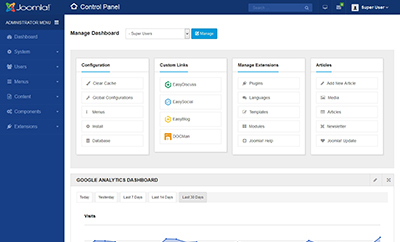
- Joomla is based on Mambo CMS which was developed by an Australian company in 2001 and initially released on August 17, 2005.
- The official version of Joomla 1.0 was released on September 22, 2005.- The latest version of Joomla! Is 3.9.1 released on 27 Nov 2018.
- Joomla 3.9 is about more than just Privacy.
- The official version of Joomla 1.0 was released on September 22, 2005.- The latest version of Joomla! Is 3.9.1 released on 27 Nov 2018.
- Joomla 3.9 is about more than just Privacy.
Features of Joomla:-
- User Manager − It allows managing the user information such as permission to edit, access, publish, create or delete the user, change the password and languages. The main part of the user manager is Authentication.
- Content Manager − It allows managing the content using WYSIWYG editor to create or edit the content in a very simple way.
- Banner Manager − It is used to add or edit the banners on the website.
- Template Manager − It manages the designs that are used on the website. The templates can be implemented without changing the content structure within a few seconds.
- Media Manager − It is the tool for managing the media files and folder in which you can easily upload, organize and manage your media files into your article editor tool.
- Contact Manager − It allows to add contacts, managing the contact
information of the particular users.
- Web Link Manager − The link resource is provided for user of the site and can be sorted into categories.
- Search − It allows users to search the appropriate information on the site. You can use smart indexing, advanced search options, auto suggest searches to make Joomla search best.
- Menu Manager − It allows to create menus and menu items and can be managed subsequently. You can put menu in any style and in multiple places
- RSS − It stands for Really Simple Syndication which helps your site
contents and RSS files to be automatically updated.
contents and RSS files to be automatically updated.
Disadvantages of JoomlaAdvantages of Joomla:-
- It is an open source platform and available for free.
- Joomla is designed to be easy to install and set up even if you're not an advanced user.
- Since Joomla is so easy to use, as a web designer or developer, you can
quickly build sites for your clients. With minimal instructions to the clients,
clients can easily manage their sites on their own.
- It is very easy to edit the content as it uses WYSIWYG editor (allows the
user to directly manipulate the layout of the document without having a
layout command).
- It ensures the safety of data content and doesn't allow anyone to edit the data.
- Joomla is designed to be easy to install and set up even if you're not an advanced user.
- Since Joomla is so easy to use, as a web designer or developer, you can
quickly build sites for your clients. With minimal instructions to the clients,
clients can easily manage their sites on their own.
- It is very easy to edit the content as it uses WYSIWYG editor (allows the
user to directly manipulate the layout of the document without having a
layout command).
- It ensures the safety of data content and doesn't allow anyone to edit the data.
● By default, Joomla is compatible with all browsers.
● The templates are very flexible to use.
● Media files can be uploaded easily in the article editor tool.
● Provides easy menu creation tool.
● The templates are very flexible to use.
● Media files can be uploaded easily in the article editor tool.
● Provides easy menu creation tool.
Disadvantages of Joomla:-
- It gives compatibility problem while installing several modules, extensions and plugins simultaneously.
- Plugins and modules are not free in Joomla.
- Development is too difficult to handle when you want to change the layout.
- Joomla is not much SEO (Search Engine Optimization) friendly.
- It makes website heavy to load and run.
- Plugins and modules are not free in Joomla.
- Development is too difficult to handle when you want to change the layout.
- Joomla is not much SEO (Search Engine Optimization) friendly.
- It makes website heavy to load and run.
Real World Examples of Joomla:-
- Corporate web sites or portals
- Corporate intranets and extranets
- Online magazines, newspapers, and publications
- E-commerce and online reservations
- Government applications
- Small business web sites
- Non-profit and organizational web sites
- Community-based portals
- School and religious web sites
- Personal or family homepages
- Corporate intranets and extranets
- Online magazines, newspapers, and publications
- E-commerce and online reservations
- Government applications
- Small business web sites
- Non-profit and organizational web sites
- Community-based portals
- School and religious web sites
- Personal or family homepages
NEXT ARTICAL IS HOW TO USE JOOMLA AND INSTALLED.
P.S:- Let me Know in comment section for any further queries and do you wantnt forget to share this post if you liked it and follow THE BABA TALKS on Social handle if you like content.

0 Comments