
PHP Sessions

- When you work with an application, you open it, do some changes, and then you close it.
- This is much like a Session. The computer knows who you are. It knows when you start the application and when you end.
- But on the internet there is one problem: the web server does not know who you are or what you do, because the HTTP address doesn't maintain state.
- Session variables solve this problem by storing user information to be used across multiple pages (e.g. username, favorite color, etc).
- By default, session variables last until the user closes the browser.
- So, Session variables hold information about one single user, and are available to all pages in one application.
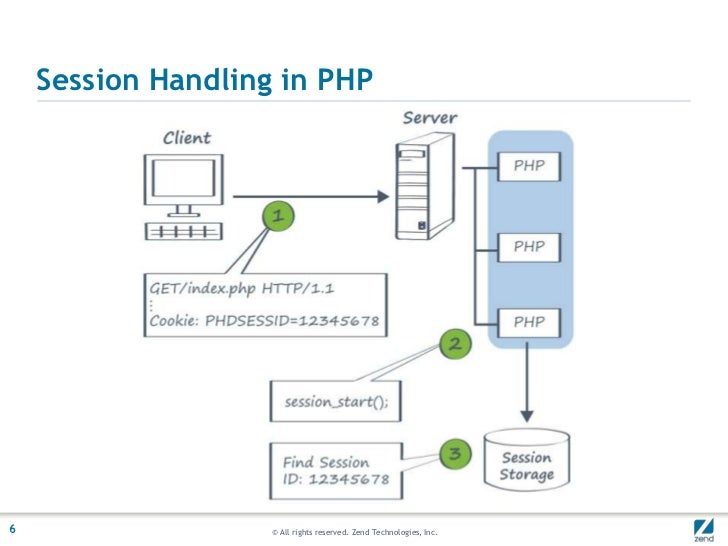
Start a PHP Session:-
- A session is started with the session_start() function.
- Session variables are set with the PHP global variable: $_SESSION.

The session_start() function must be the very frst thing in your document. Before any HTML tags.
Why and when to use Sessions?
- You want to store important information such as the user id more securely on the server where malicious users cannot temper with them.
- You want to pass values from one page to another.
- You want the alternative to cookies on browsers that do not support cookies.
- You want to store global variables in an efcient and more secure way compared to passing them in the URL
- You are developing an application such as a shopping cart that has to temporary store information with a capacity larger than 4KB.
How does session work?

- Most sessions set a user-key on the user's computer that looks something like this:
765487cf34ert8dede5a562e4f3a7e12.
- Then, when a session is opened on another page, it scans the computer for a user-key.
- If there is a match, it accesses that session, if not, it starts a new session.
Modify a PHP Session Variable:-
To change a session variable, just overwrite it:
<?php
session_start();
?>
session_start();
?>
<html>
<body>
<?php
// to change a session variable, just overwrite it
$_SESSION["favcolor"] = "yellow";
print_r($_SESSION);
?>
// to change a session variable, just overwrite it
$_SESSION["favcolor"] = "yellow";
print_r($_SESSION);
?>
</body>
</html>
</html>
Destroy a PHP Session:-
- To remove all global session variables and destroy the session, use session_unset() and session_destroy():
- To remove all global session variables and destroy the session, use session_unset() and session_destroy():
<?php
session_start();
session_start();
?>
<!DOCTYPE html>
<html>
<body>
<?php
// remove all session variables
session_unset();
// destroy the session
session_destroy(); ?>
// remove all session variables
session_unset();
// destroy the session
session_destroy(); ?>
</body>
</html>
</html>
Most Important Question In Exam:-
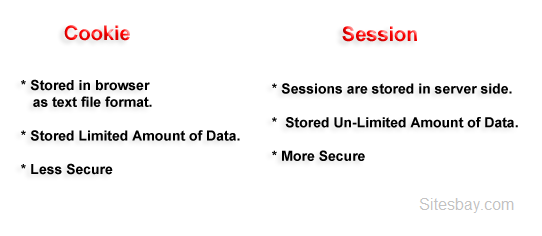
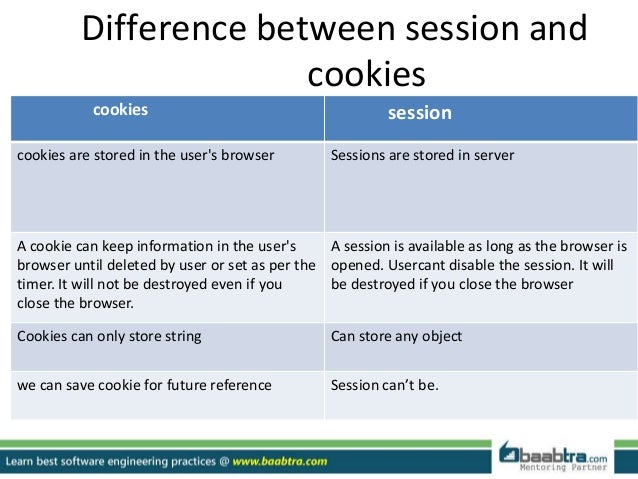
Difference Between Cookie And Session:-

0 Comments