
PHP Validation
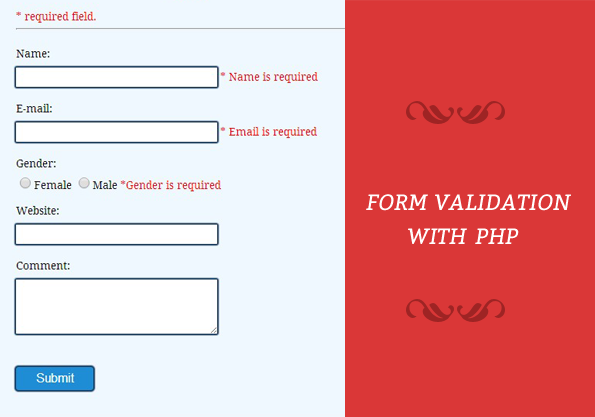
- Validation means check the input submitted by the user.
- There are two types of validation are available in PHP.
- Client-Side Validation– Validation is performed on the client machine web browsers.
- Server Side Validation
– After submitted by data, The data has sent to a server and perform validation checks in server machine.
- Server Side Validation
– After submitted by data, The data has sent to a server and perform validation checks in server machine.
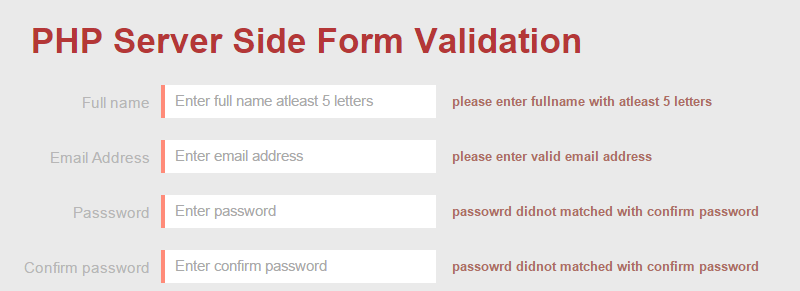
- Client-side validation is faster than server-side because, the validation takes place on client side (on browser) and the networking time from client to server is saved.
- On the other hand, server-side validation is done on the web server. Then the server renders the data into html page and sends back to the client (browser).
- Server-side validation is more secure than the client-side as the user cannot see the code even he does a view- source.
- On the other hand, server-side validation is done on the web server. Then the server renders the data into html page and sends back to the client (browser).
- Server-side validation is more secure than the client-side as the user cannot see the code even he does a view- source.
validation can be done using various ways:
– Using HTML5
– Using Regular Expressions in PHP
– Using HTML5
– Using Regular Expressions in PHP
Some of Validation rules for Field
Validation Rules:-
- Name :-Should required letters and white-space
- Email :-Should required @ and .
- Website:- Should required a valid URL
- Radio:- Must be selectable at least once
- Check Box:- Must be checkable at least once
- Drop Down:- menu Must be selectable at least once
- Name :-Should required letters and white-space
- Email :-Should required @ and .
- Website:- Should required a valid URL
- Radio:- Must be selectable at least once
- Check Box:- Must be checkable at least once
- Drop Down:- menu Must be selectable at least once
Using HTML5
- HTML5 includes a fairly solid form validation mechanism powered by the
following attributes:
- HTML5 includes a fairly solid form validation mechanism powered by the
following attributes:
– Input
– Type
– Pattern
– require
– Type
– Pattern
– require
Input Attribute:-
– The type attribute specifes the type of <input> element to display.
– The default type is text.
– The type attribute specifes the type of <input> element to display.
– The default type is text.
The type can be any of following:
- button
- checkbox
- date
- color
- email
- file
- file
- hidden
- image
- month
- number
- password
- password
- radio
- reset
- submit
- tel
- text
- text
- time
- url
- week
Type attribute:-
– <input type="text" /> for handling simple text
data.
– <input type="email" /> validates the feld to
ensure the entered data is in fact a valid email
address.
– <input type="number" /> for validating numbers
– <input type="url" /> for validation URLs
– <input type="tel" /> for validating telephone
numbers
– <input type="text" /> for handling simple text
data.
– <input type="email" /> validates the feld to
ensure the entered data is in fact a valid email
address.
– <input type="number" /> for validating numbers
– <input type="url" /> for validation URLs
– <input type="tel" /> for validating telephone
numbers
Pattern attribute:-
– The pattern attribute specifes a format that the feld value is checked against.
– Regular expressions are a language used for parsing and manipulating text
– Regular expressions (RegEX) provide a powerful, concise, and fexible means for matching strings of text such as particular characters, words, or patterns of characters.
– By passing a RegEX string as the value for the pattern attribute, you can dictate what value is acceptable by the form feld and also inform the
user of errors.
– The pattern attribute specifes a format that the feld value is checked against.
– Regular expressions are a language used for parsing and manipulating text
– Regular expressions (RegEX) provide a powerful, concise, and fexible means for matching strings of text such as particular characters, words, or patterns of characters.
– By passing a RegEX string as the value for the pattern attribute, you can dictate what value is acceptable by the form feld and also inform the
user of errors.
- Let’s see some examples of using regular expressions for validating form feld data.
– For phone no:
<label>Phone Number:</label>
<input type="tel" pattern="^\d{4}-\d{3}-\d{4}$" >
Regex Syntax:-
– A Regular Expression (or Regex) is a pattern (or flter) that accepts a set of text strings that matches the pattern.
– A regex is typically delimited by a pair of forward slashes /.../ (or quotes or other user defned symbol).
– It consists of a sequence of characters, meta characters (such as ., \d, \s, \S) and operators such as +, *, ?, |, ^)
– A Regular Expression (or Regex) is a pattern (or flter) that accepts a set of text strings that matches the pattern.
– A regex is typically delimited by a pair of forward slashes /.../ (or quotes or other user defned symbol).
– It consists of a sequence of characters, meta characters (such as ., \d, \s, \S) and operators such as +, *, ?, |, ^)
Matching a Character:-
– Most characters, including all letters (a-z and A-Z) and digits (0-9), match themselves.
– For example, the regex /a/ matches the single-character string "a"; /x/ matches "x"; and /9/ matches "9".
– Special characters without special meanings also matches itself. For example, /=/ matches "=".
– Escape Sequence: To match special characters with special meanings in regex, such as + * / \ ( ) [ ] { } and more, we need to prepend it with a back-slash, known as escape sequence.
– For example, /\+/ matches "+"; /\[/ matches matches "[".
– Most characters, including all letters (a-z and A-Z) and digits (0-9), match themselves.
– For example, the regex /a/ matches the single-character string "a"; /x/ matches "x"; and /9/ matches "9".
– Special characters without special meanings also matches itself. For example, /=/ matches "=".
– Escape Sequence: To match special characters with special meanings in regex, such as + * / \ ( ) [ ] { } and more, we need to prepend it with a back-slash, known as escape sequence.
– For example, /\+/ matches "+"; /\[/ matches matches "[".
Matching a Text String of Characters:-
For example, the regex /Friday/ matches the string "Friday".
OR (|) Operator
– You can provide alternatives using the "OR" operator, denoted by a vertical bar '|'.
– For example, the regex /four|for|foor|4/ matches strings "four", "for", "foor" or "4".
For example, the regex /Friday/ matches the string "Friday".
OR (|) Operator
– You can provide alternatives using the "OR" operator, denoted by a vertical bar '|'.
– For example, the regex /four|for|foor|4/ matches strings "four", "for", "foor" or "4".

Password Pattern:-
An <input> element with type="password" that must contain 6 or more characters:
An <input> element with type="password" that must contain 6 or more characters:
<form action="/action_page.php">
Password: <input type="password" name="pw"
pattern=".{6,}" title="Six or more characters">
<input type="submit">
</form>
An <input> element with type="password" that must
contain 8 or more characters that are of at least one
number, and one uppercase and lowercase letter:
contain 8 or more characters that are of at least one
number, and one uppercase and lowercase letter:
<form action="/action_page.php">
Password: <input type="password" name="pw"
pattern="(?=.*\d)(?=.*[a-z])(?=.*[A-Z]).{8,}" title="Must
contain at least one number and one uppercase and
lowercase letter, and at least 8 or more characters">
<input type="submit">
</form>
Password: <input type="password" name="pw"
pattern="(?=.*\d)(?=.*[a-z])(?=.*[A-Z]).{8,}" title="Must
contain at least one number and one uppercase and
lowercase letter, and at least 8 or more characters">
<input type="submit">
</form>
Phone number pattern:-
<form>
Phone Number (format: xxx-xxx-xxxx):
<input type="tel" pattern="^\d{3}-\d{3}-\d{4}$" required >
<input type="submit" value="Submit">
</form>
Email Pattern:-
An <input> element with type="email" that must be in the
following order: characters@characters.domain (characters
followed by an @ sign, followed by more characters, and then a
"." .
After the "." sign, you can only write 2 to 3 letters from a to z:
<form action="/action_page.php">
E-mail: <input type="email" name="email" pattern="[a-z0-9._-]+@[a-z0-9.-]+\.[a-z]{2,3}$">
<input type="submit">
</form>
Or /([w-]+@[w-]+.[w-]+)/
An <input> element with type="email" that must be in the
following order: characters@characters.domain (characters
followed by an @ sign, followed by more characters, and then a
"." .
After the "." sign, you can only write 2 to 3 letters from a to z:
<form action="/action_page.php">
E-mail: <input type="email" name="email" pattern="[a-z0-9._-]+@[a-z0-9.-]+\.[a-z]{2,3}$">
<input type="submit">
</form>
Or /([w-]+@[w-]+.[w-]+)/
Using Regular Expressions in PHP:-
- Regular expressions are a powerful tool for examining and modifying text.
- Regular expressions themselves, with a general pattern notation almost like a mini programming language, allow you to describe and parse text.
- The type of regular expression which we use is Perl-Compatible Regular Expressions (PCRE).
Some characters have special meanings in regular expressions.
- Regular expressions are a powerful tool for examining and modifying text.
- Regular expressions themselves, with a general pattern notation almost like a mini programming language, allow you to describe and parse text.
- The type of regular expression which we use is Perl-Compatible Regular Expressions (PCRE).
Some characters have special meanings in regular expressions.
- A dollar sign ($) is used to match strings that end with the given
pattern.
- Similarly, a caret (^) character at the beginning of a regular expression indicates that it must match the beginning of the string.
- The characters that match themselves are called literals.
- The characters that have special meanings are called meta
characters.
- The dot (.) metacharacter matches any single character except
- newline (\). So, the pattern h.t matches hat, hothit, hut, h7t, etc.

preg_match() function:-
- The preg_match() function performs Perl-style pattern matching on a string.
- preg_match() parameters. takes two basic and three optional parameters
- These parameters are, in order, a regular expression string, a source string, an array variable which stores matches, a fag argument and an ofset parameter that can be used to specify the alternate place from which to start the search:
preg_match ( pattern, subject [, matches [, fags [,offset]]]) The preg_match() function returns 1 if a match is found and 0 otherwise.
<?php
if (preg_match("/ell/", "Hello World!", $matches)) {
echo "Match was found <br />";
echo $matches[0];
}
?>
preg_match() function Example:-
<?php
if (preg_match("/ll.*/", "The History of
Halloween", $matches)) {
echo "Match was found <br />";
echo $matches[0];
}
?>

pattern.
- Similarly, a caret (^) character at the beginning of a regular expression indicates that it must match the beginning of the string.
- The characters that match themselves are called literals.
- The characters that have special meanings are called meta
characters.
- The dot (.) metacharacter matches any single character except
- newline (\). So, the pattern h.t matches hat, hothit, hut, h7t, etc.

preg_match() function:-
- The preg_match() function performs Perl-style pattern matching on a string.
- preg_match() parameters. takes two basic and three optional parameters
- These parameters are, in order, a regular expression string, a source string, an array variable which stores matches, a fag argument and an ofset parameter that can be used to specify the alternate place from which to start the search:
preg_match ( pattern, subject [, matches [, fags [,offset]]]) The preg_match() function returns 1 if a match is found and 0 otherwise.
<?php
if (preg_match("/ell/", "Hello World!", $matches)) {
echo "Match was found <br />";
echo $matches[0];
}
?>
preg_match() function Example:-
<?php
if (preg_match("/ll.*/", "The History of
Halloween", $matches)) {
echo "Match was found <br />";
echo $matches[0];
}
?>



0 Comments