
Loops:-
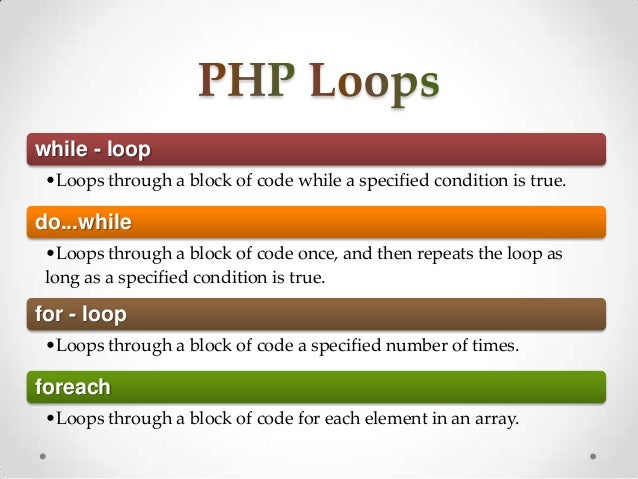
- PHP while loops execute a block of code while the specifed condition is true.
-In PHP, we have the following looping statements:
-while - loops through a block of code as long as the specifed condition is true -do...while - loops through a block of code once, and then repeats the loop as long as the specifed condition is true
-for - loops through a block of code a specifed number of times
-foreach - loops through a block of code for each element in an array
The while loop:-
The while loop executes a block of code as long as the specifed condition is true.
Syntax
while (condition is true) {
code to be executed; <?php
$x = 1;
while($x <= 5) {
echo "The number is: $x <br>";
$x++;
}
?>
}
The do..while loop:-
The do...while loop will always execute the block of code once, it will then check the condition, and repeat the loop while the specifed condition is true.
Syntax
do {
code to be executed;
} while (condition is true);
<?php
$x = 1;
do {
echo "The number is: $x <br>";
$x++;
} while ($x <= 5);
?>
For Loops:-
PHP for loops execute a block of code a specifed number of times. The for loop is used when you know in advance how many times the script should run.
Syntaxfor (init counter; test counter; increment counter) {
code to be executed;
}
<?php
for ($x = 0; $x <= 10; $x++) {
echo "The number is: $x <br>";
}
?>
For each loops:-
-The foreach loop works only on arrays, and is used to loop through each key/value pair in an array.
Syntax
foreach ($array as $value) {
code to be executed;
}
-For every loop iteration, the value of the current array element is assigned to $value and the array pointer is moved by one, until it reaches the last array element.
For each loops:-
<?php
$colors = array("red", "green", "blue",
"yellow");
foreach ($colors as $value)
{
echo "$value <br>";
}
?>
Variables Scope in PHP:-
-In PHP, variables can be declared anywhere in the script.
-The scope of a variable is the part of the script where the variable can be referenced/used.
-PHP has three diferent variablescopes:
- local
- global
- static
Local Variable:-
-A variable declared within a function has a LOCALSCOPE and can only be accessed within that function:
<?php
function myTest() {
$x = 5; // local scope
echo "<p>Variable x inside function is: $x</p>";
}
myTest();
// using x outside the function will generate an error
echo "<p>Variable x outside function is: $x</p>";
?>
Local Variables
- You can have local variables with the same name in diferent functions,
because local variables are only recognized by the function in which
they are declared.
Global Variable
-A variable declared outside a function has a GLOBAL SCOPE and can only be accessed outside a function
<?php
$x = 5; // global scope
function myTest() {
// using x inside this function will generate an error
echo "<p>Variable x inside function is: $x</p>";
}
myTest();
echo "<p>Variable x outside function is: $x</p>";
?>
Static Variables:-
<?php
function myTest() {
static $x = 0;
echo $x;
$x++;
}
myTest();
myTest();
myTest();
?>
Then, each time the function is called, that variable will still
have the information it contained from the last time the
function was called.
Note: The variable is still local to the function.
Arrays in PHP:-

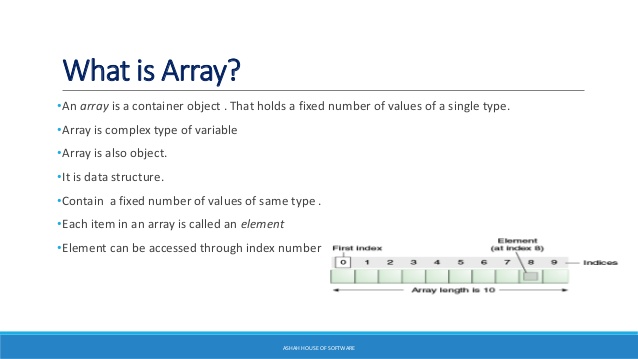
-For example if you want to store 100 numbers then instead of defning 100 variables its easy to defne an array of 100 length.
- There are three diferent kind of arrays and each array value is accessed using an ID which is called array index.
-Numeric array - An array with a numeric index. Values are stored and accessed in linear fashion.
-Associative array - An array with strings as index. This stores element values in association with key values rather than in a strict linear index order. -Multidimensional array - An array containing one or more arrays and values are accessed using multiple indices.
Also known as indexed array.
-These arrays can store numbers, strings and any object but their index will be represented by numbers. By default, the array index starts from zero. In an indexed or numeric array, the indexes are automatically assigned and start with 0, and the values can be any data type.
Numeric / Indexed Array
$colors = array("Red", "Green", "Blue");
or
$colors[0] = "Red";
$colors[1] = "Green";
$colors[2] = "Blue";
Associative Array :-
The associative arrays are very similar to numeric arrays in term of functionality but they are diferent in terms of their index. Associative array will have their index as string so that you can establish a strong association between key and values. To store the salaries of employees in an array, a numerically indexed array would not be the best choice. Instead, we could use the employees names as the keys in our associative array, and the value would be their respective salary. NOTE: Don't keep associative array inside double quote while printing, otherwise it would not return any value.
Associative Array
$ages = array("Peter"=>22, "Clark"=>32,
"John"=>28);
or
$ages["Peter"] = "22";
$ages["Clark"] = "32";
$ages["John"] = "28";
Multidimensional Array :-
A multi-dimensional array each element in the main array can also be an array. And each element in the sub-array can be an array, and so on. Values in the multi-dimensional array are accessed using multiple index. The dimension of an array indicates the number of indices you need to select an element. For a two-dimensional array you need two indices to select an element. For a three-dimensional array you need three indices to select an element.
Multidimensional Array
$contacts = array(
array("name" => "Peter Parker",
"email" => "peterparker@mail.com"),
array("name" => "Clark Kent",
"email" => "clarkkent@mail.com"),
array("name" => "Harry Potter",
"email" => "harrypotter@mail.com")
);
wo dimensional Arrays
$cars = array
(
array("Volvo",22,18),
array("BMW",15,13),
array("XUV",5,2),
array("Land Rover",17,15)
);
Two dimensional Arrays
<?php
for ($row = 0; $row < 4; $row++) {
echo "<p><b>Row number $row</b></p>";
echo "<ul>";
for ($col = 0; $col < 3; $col++) {
echo "<li>".$cars[$row][$col]."</li>";
}
echo "</ul>";
}
?>
PHP - Sort Functions For Arrays:-
- sort() - sort arrays in ascending order
- rsort() - sort arrays in descending order
-asort() - sort associative arrays in
ascending order, according to the value
-arsort() - sort associative arrays in
descending order, according to the value
-ksort() - sort associative arrays in
ascending order, according to the key
-krsort() - sort associative arrays in
descending order, according to the key
print_r function:-
The print_r() function is used to print human-readable information about
a variable.
Syntax
print_r(var_name, return_output)

0 Comments