
What is Form?
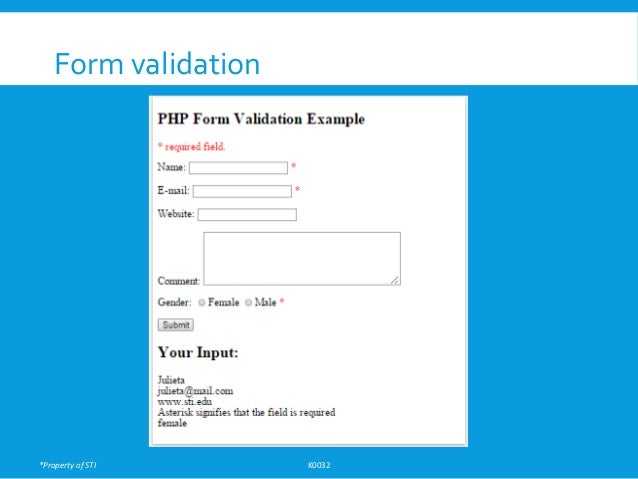
-Forms are used to get input from the user and submit it to the web server for processing.
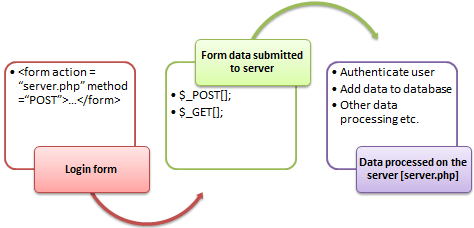
- The diagram below illustrates the form handling process.
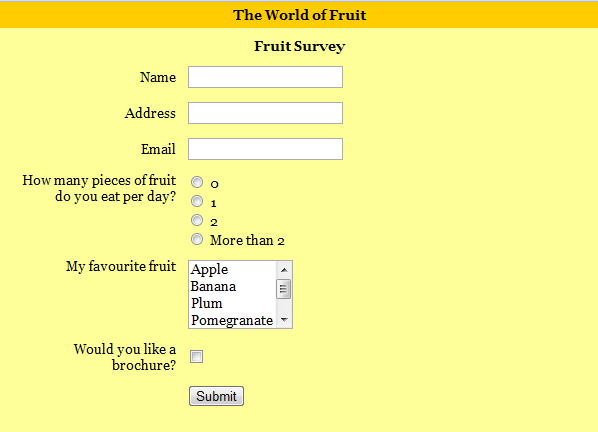
When & Why From?
- Forms come in handy when developing fexible and dynamic applications that accept user input.
- Forms can be used to edit already existing data from the database -Following things are required to create a form:
- Opening and closing form tags <form>...</form>
- Form submission type POST or GET Submission URL that will process the submitted data
- Input felds such as input boxes, text areas, buttons,checkboxes etc.
Submitting data to Server
The action attribute of the form specifes the submission URL that processes the data.
- The method attribute submission type.
- specifes the Following are the Methods for submitting data to server:-
- GET
- POST
– REQUEST
- There are two ways the browser client can send information to the web server. – The GET Method
– The POST Method
- Before the browser sends the information, it encodes it using a scheme called URL encoding.In this scheme, name/value pairs are joined with equal signs and diferent pairs are separated by the ampersand.
- name1=value1&name2=value2&name3=value3
-Spaces are removed and replaced with the + character and any other nonalphanumeric characters are replaced with a hexadecimal values.
- After the information is encoded it is sent to the server.
PHP Superglobal Variables:-
-Several predefned variables in PHP are "superglobals", which means that they are always accessible, regardless of scope - and you can access them from any function, class or fle without having to do anything special.
- $GLOBALS
- $_SERVER
- $_REQUEST
- $_POST
- $_GET
- $_FILES
- $_COOKIE
- $_SESSION
- $_SERVER
- $_REQUEST
- $_POST
- $_GET
- $_FILES
- $_COOKIE
- $_SESSION
PHP $GLOBALS:-
$GLOBALS is a PHP super global variable which is used to access global variables from anywhere in the PHP script (also from within functions or methods).
- PHP stores all global variables in an array called $GLOBALS[index].
- The index holds the name of the variable.
PHP $SERVER:-
- $_SERVER is a PHP super global variabl which holds information about headers, paths, and script locations.
- $_SERVER is a PHP super global variabl which holds information about headers, paths, and script locations.
PHP _POST Method:-
The POST method transfers information via HTTP headers.
- The information is encoded as described in case of GET method and put into a header called QUERY_STRING.
- The array variable can be accessed from any script in the program; it has a global scope.
_POST Syntax:-
Syntax
<?php
$_POST['variable_name'];
?>
“$_POST[...]” is the PHP array
“'variable_name'” is the URL variable
name.
Syntax
<?php
$_POST['variable_name'];
?>
“$_POST[...]” is the PHP array
“'variable_name'” is the URL variable
name.
- The POST method does not have any restriction on data size to be sent.
- The POST method can be used to send ASCII as well as binary data.
- The data sent by POST method goes through HTTP header so security depend s on HTTP protocol.
-By using Secure HTTP (https you can make sure that your information is secure.
- The PHP provides $_POST associative array to access all the sent information using GET method.
_GET Method:-
The GET method sends the encoded user information appended to the page request.
-The page and the encoded information are separated by the ? Character.
- The array variable can be accessed from any script in the program; it has a global scope.
Syntax
Syntax
<?php
$_GET['variable_name'];
?>
“$_GET[...]” is the PHP array
“'variable_name'” is the URL variable
name
Syntax
<?php
$_GET['variable_name'];
?>
“$_GET[...]” is the PHP array
“'variable_name'” is the URL variable
name
-The GET method produces a long string that appears in your server logs, in the browser's Location: box.
- The GET method is restricted to send upto 1024 characters only.
- Never use GET method if you have password or other sensitive information to be sent to the server.
- GET can't be used to send binary data, like images or word documents, to the server.
- The data sent by GET method can be accessed using QUERY_STRING environment variable. The PHP provides $_GET associative array to access all the sent information using GET method.
Difference Between GET Method And POST Method:-

REQUEST MEthod:-
- The PHP $_REQUEST variable contains the contents of both $_GET, $_POST, and $_COOKIE.
- The PHP $_REQUEST variable can be used to get the result from form data sent with both the GET and POST methods.
- Here $_PHP_SELF variable contains the name of self script in which it is being called. $_REQUEST — HTTP Request variables.
- The PHP $_REQUEST variable contains the contents of both $_GET, $_POST, and $_COOKIE.
- The PHP $_REQUEST variable can be used to get the result from form data sent with both the GET and POST methods.
- Here $_PHP_SELF variable contains the name of self script in which it is being called. $_REQUEST — HTTP Request variables.
Form Input:-
Attribute Values
Value
-button:-
Defnes a clickable button (mostly used with a JavaScript to
activate a script)
- checkbox:-
activate a script)
- checkbox:-
Defines a checkbox
- color:-
- color:-
Defines a color picker
- date:-
- date:-
Defines a date control (year, month and day (no time))
- datetimelocal:-
- datetimelocal:-
Defines a date and time control (year, month, day, hour,
minute, second, and fraction of a second (no time zone)
-email:-
minute, second, and fraction of a second (no time zone)
-email:-
Defines a feld for an e-mail address
-file:-
-file:-
Defines a fle-select feld and a "Browse..." button (for fle
uploads)
-hidden:-
uploads)
-hidden:-
Defines a hidden input feld
- image:-
- image:-
Defines an image as the submit button.
isset():-
- The isset () function is used to check whether a variable is set or not.
- The isset() function return false if testing variable contains a NULL value.
- The isset() function return false if testing variable contains a NULL value.


0 Comments