
Cloud Services

There are usually three models of cloud service to compare: Software as a Service (SaaS), Platform as a Service (PaaS), and Infrastructure as a Service (IaaS). Each of these has its own benefits as well variances and it is necessary to understand the differences among SaaS, PaaS, and IaaS to know how to best choose one for your organization.


Common Examples of SaaS, PaaS, & IaaS:-

SaaS:-
- Google Apps, Dropbox, Salesforce, Cisco WebEx, Concur, GoToMeeting
PaaS:-
- AWS Elastic Beanstalk, Windows Azure, Heroku, Force.com, Google App
Engine, Apache Stratos, OpenShift
Engine, Apache Stratos, OpenShift
IaaS:-
- DigitalOcean, Linode, Rackspace, Amazon Web Services (AWS), Cisco
Metapod, Microsoft Azure, Google Compute Engine (GCE)
Metapod, Microsoft Azure, Google Compute Engine (GCE)
SaaS: Software as a Service:-

Software as a Service, also known as cloud application services, represent the most commonly utilized option for businesses in the cloud market. SaaS utilizes the internet to deliver applications to its users, which are managed by a third-party vendor. A majority of SaaS applications are run directly through the web browser, and do not require any downloads or installations on the client side.
SaaS Advantages:-

SaaS provides numerous advantages to employees and companies by greatly reducing the time and money spent on tedious tasks such as installing, managing, and upgrading software. This frees up a lot of time for technical staff to spend on more pressing matters and issues within the organization.
SaaS Delivery:-
Due to its web delivery model, SaaS eliminates the need to download and install applications on each individual computer; a nightmare for IT staff. With SaaS, vendors manage all of the potential technical issues, such as data, middleware, servers, and storage, while businesses can simply streamline their maintenance and support.
SaaS Characteristics:-
There are a few ways to help you determine when SaaS is being utilized:
-Managed from a central location
- Hosted on a remote server
- Accessible over the internet
- Users not responsible for hardware or software updates
When to Use SaaS:-
There are many different situations in which SaaS may be the most beneficial, including:
- If you are a startup or small company that needs to launch ecommerce quickly and don’t have time for server issues or software
- For short-term projects that require collaboration
- If you use applications that aren’t in-demand very often, such as tax software
- For applications that need both web and mobile access
Examples of SaaS:-
- Google Apps,
- Dropbox,
- Salesforce,
- Cisco WebEx,
- Concur,
- GoToMeeting
- Dropbox,
- Salesforce,
- Cisco WebEx,
- Concur,
- GoToMeeting
PaaS: Platform as a Service:-
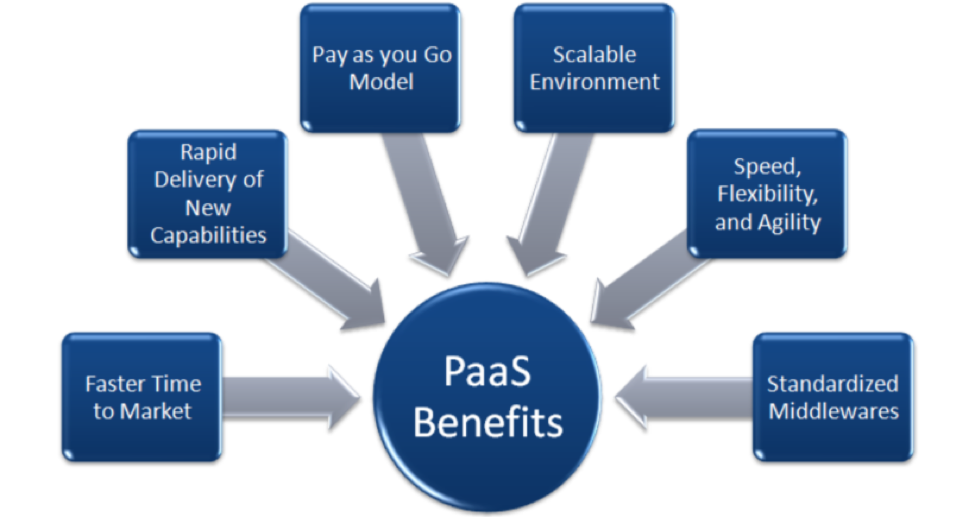
Cloud platform services, or Platform as a Service (PaaS), provide cloud components to certain software while being used mainly for applications. PaaS provides a framework for developers that they can build upon and use to create customized applications. All servers, storage, and networking can be managed by the enterprise or a third-party provider while the developers can maintain management of the applications.
PaaS Delivery:-
- The delivery model of PaaS is similar to SaaS, except instead of delivering the software over the internet, PaaS provides a platform for software creation. This platform is delivered over the web, and gives developers the freedom to concentrate on building the software while still not having to worry about operating systems, software updates, storage, or infrastructure.
- PaaS allows businesses to design and create applications that are built into the PaaS with special software components. These applications, or middleware, are scalable and highly available as they take on certain cloud characteristics.
PaaS Advantages:-

No matter what size of company you may be in, there are numerous advantages for using PaaS:
- Makes the development and deployment of apps simple and cost-effective
- Scalable
- Highly available
- Gives developers the ability to create customized apps without the headache of maintaining the software
- Greatly reduces the amount of coding
- Automates business policy
- Allows easy migration to the hybrid model
PaaS Characteristics:-
PaaS has many characteristics that define it as a cloud service, including:
- It is built on virtualization technology, meaning resources can easily be scaled up or down as your business changes
- Provides a variety of services to assist with the development, testing, and deployment of apps
- Numerous users can access the same development application
-Web services and databases are integrated
When to Use PaaS:-
- There are many situations that utilizing PaaS is beneficial or even necessary. If there are multiple developers working on the same development project, or if other vendors must be included as well, PaaS can provide great speed and flexibility to the entire process. PaaS is also beneficial if you wish to be able to create your own customized applications. This cloud service also can greatly reduce costs and it can simplify some challenges that come up if you are rapidly developing or deploying an app.
Examples of PaaS:-
- AWS Elastic Beanstalk,
- Windows Azure,
- Heroku,
- Force.com,
- Google App Engine,
- Apache Stratos,
- OpenShift
- AWS Elastic Beanstalk,
- Windows Azure,
- Heroku,
- Force.com,
- Google App Engine,
- Apache Stratos,
- OpenShift
IaaS: Infrastructure as a Service:-

- Cloud infrastructure services, known as Infrastructure as a Service (IaaS), are made of highly scalable and automated compute resources. IaaS is fully self-service for accessing and monitoring things like compute, networking, storage, and other services, and it allows businesses to purchase resources on- demand and as-needed instead of having to buy hardware outright.
IaaS Delivery:-
- IaaS delivers Cloud Computing infrastructure to organizations, including things such as servers, network, operating systems, and storage, through virtualization technology. These cloud servers are typically provided to the client through a dashboard or an API, and IaaS clients have complete control over the entire infrastructure. IaaS provides the same technologies and capabilities as a traditional data center without having to physically maintain or manage all of it. IaaS clients can still access their servers and storage directly, but it is all outsourced through a “virtual data center” in the cloud.
- As opposed to SaaS or PaaS, IaaS clients are responsible for managing aspects such as applications, runtime, OSes, middleware, and data. However, providers of the IaaS manage the servers, hard drives, networking, virtualization, and storage. Some providers even offer more services outside of the virtualization layer, such as databases or message queuing.
IaaS Advantages:-
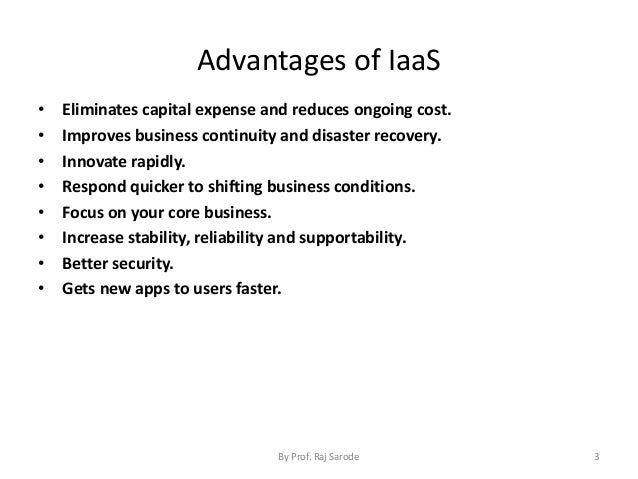
There are many benefits of choosing IaaS, such as that it:
- Is the most flexible cloud computing model
-Easily allows for automated deployment of storage, networking, servers, and processing power
- Hardware can be purchased based on consumption
- Gives clients complete control of their infrastructure
- Resources can be purchased as-needed
- Is highly scalable
IaaS Characteristics:-
Some characteristics to look for when considering IaaS are:
-Resources are available as a service
- The cost varies depending on consumption
- Services are highly scalable
- Typically includes multiple users on a single piece of hardware
-Provides complete control of the infrastructure to organizations
-Dynamic and flexible
When to Use IaaS:-
- Just as with SaaS and PaaS, there are specific situations when it is the most advantageous to use IaaS. If you are a startup or a small company, IaaS is a great option so you don’t have to spend the time or money trying to create hardware and software. IaaS is also beneficial for large organizations who wish to have complete control over their applications and infrastructures, but are looking to only purchase what is actually consumed or needed. For rapidly growing companies, IaaS can be a good option as you don’t have to commit to a specific hardware or software as your needs change and evolve. It also helps if you are ensure what demands a new application will need as there is a lot of flexibility to scale up or down as needed.
Examples of IaaS:-
- DigitalOcean,
- Linode,
- Rackspace,
- Amazon Web Services (AWS),
- Cisco Metapod,
-Microsoft Azure,
-Google Compute Engine (GCE)
AND IF YOU INTERESTED IN Software project management Link Below:-

3 Comments
I like this post, it's a very useful lot to me and this is a very excellent post. I hope it will more helpful in my future. I expect more updates in your blog...
ReplyDeleteExcel Training in Chennai
Advanced Excel Training in Chennai
Tableau Training in Chennai
Pega Training in Chennai
Oracle DBA Training in Chennai
Unix Training in Chennai
Power BI Training in Chennai
Oracle Training in Chennai
Excel Training in Chennai
Advanced Excel Training in Chennai
thank you
ReplyDeleteThe article is wonderful with all these diagrams thank you for providing this much useful information . we are grateful for you . keeping posting similar informative articles thanks again
ReplyDeleteCloud Migration Services
AWS Cloud Migration Services
Azure Cloud Migration Services
VMware Cloud Migration Services
Cloud Migration tool
Database Migration Services